Quickstart Guide
Get up and running with pni501 (v0.1.4) in minutes. This guide walks through installing the CLI, initializing .pni/ in a target repository, verifying pre-flight readiness gates, and executing the stateful Pull-Push workflow loop to generate a 7-axis score JSON and a 7-chapter A4 PDF report.
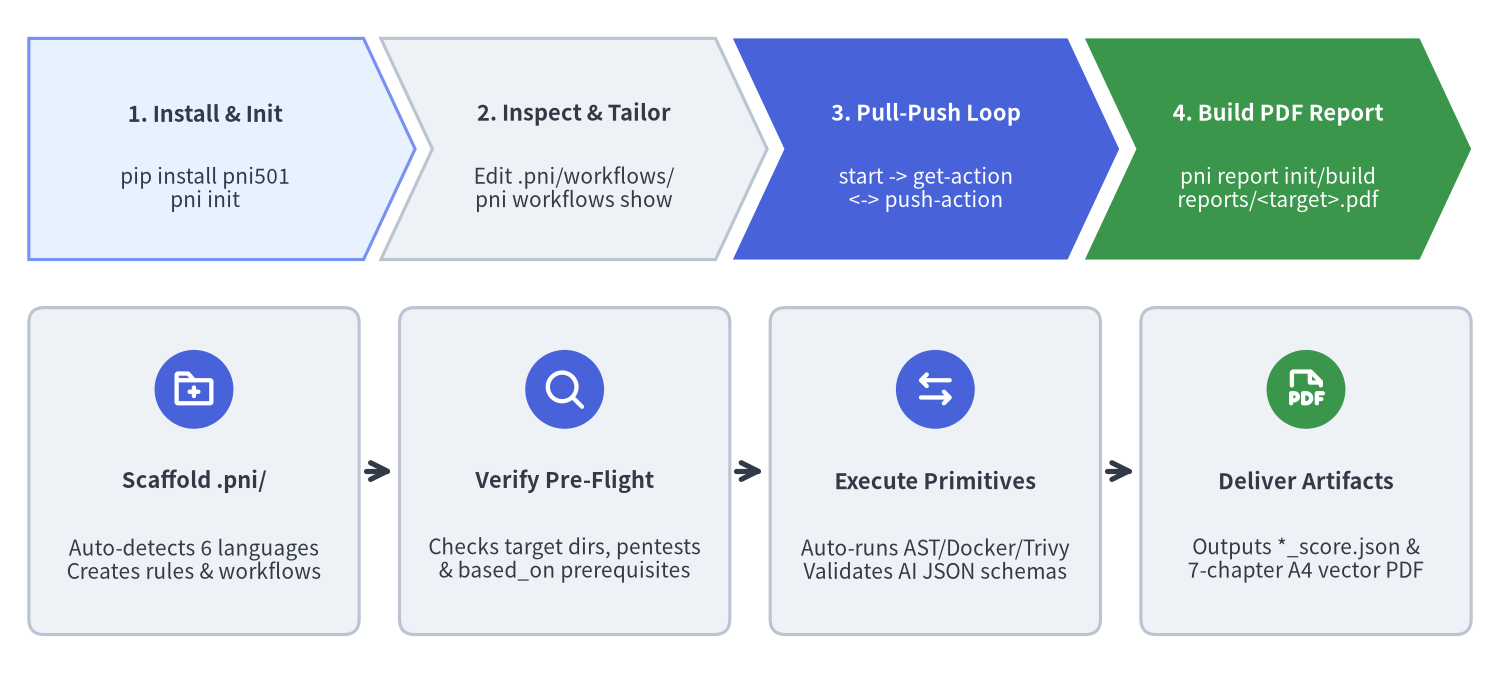
Source Code
from drawlib.canvas import save, setup
from drawlib.icons import phosphor
from drawlib.smartarts import CardList, ChevronProcess
from drawlib.styles import Styles

setup(width=156, height=70, dpi=150)

pipeline = ChevronProcess(
    style=Styles.PrimaryNeutral,
    text_style=Styles.DarkBold.patch(text_size=10.5),
    description_style=Styles.Dark.patch(text_size=10.0),
    corner_angle=65.0,
    spacing=1.8,
    flat_left_end=True,
)
pipeline.add(
    "1. Install & Init",
    description="pip install pni501\npni init",
)
pipeline.add(
    "2. Inspect & Tailor",
    description="Edit .pni/workflows/\npni workflows show",
    style=Styles.Neutral,
)
pipeline.add(
    "3. Pull-Push Loop",
    description="start -> get-action\n<-> push-action",
    style=Styles.PrimaryFlat,
    text_style=Styles.WhiteBold.patch(text_size=10.5),
    description_style=Styles.White.patch(text_size=10.0),
)
pipeline.add(
    "4. Build PDF Report",
    description="pni report init/build\nreports/<target>.pdf",
    style=Styles.SuccessFlat,
    text_style=Styles.WhiteBold.patch(text_size=10.5),
    description_style=Styles.White.patch(text_size=10.0),
)
pipeline.draw(xy=(3.0, 43.0), width=150.0, height=23.0)

commands = CardList(
    style=Styles.Neutral.patch(shape_r=1.6),
    text_style=Styles.DarkBold.patch(text_size=10.5),
    description_style=Styles.Dark.patch(text_size=10.0),
    badge_shape="circle",
    badge_style=Styles.PrimaryFlat,
    badge_text_style=Styles.WhiteBold.patch(text_size=10.0),
    icon_style=Styles.WhiteBold,
    direction="horizontal",
    show_arrows=True,
    arrow_style=Styles.DarkBold,
    spacing=3.0,
)
commands.add(
    "Scaffold .pni/",
    "Auto-detects 6 languages\nCreates rules & workflows",
    icon=phosphor.folder_plus,
)
commands.add(
    "Verify Pre-Flight",
    "Checks target dirs, pentests\n& based_on prerequisites",
    icon=phosphor.magnifying_glass,
)
commands.add(
    "Execute Primitives",
    "Auto-runs AST/Docker/Trivy\nValidates AI JSON schemas",
    icon=phosphor.arrows_left_right,
)
commands.add(
    "Deliver Artifacts",
    "Outputs *_score.json &\n7-chapter A4 vector PDF",
    badge_style=Styles.SuccessFlat,
    icon=phosphor.file_pdf,
)
commands.draw(xy=(3.0, 4.0), width=150.0, height=34.0)
save()
1. Prerequisites & Installation
pni501 requires Python 3.11+ (>=3.11). For containerized runtime checks (run_check), vulnerability scans (security_scan), and loopback penetration tests (web_pentest), Docker should also be available on the host machine.
Install pni501 from PyPI using pip or uv and verify the CLI version:
# Option A: Install via pip
pip install pni501

# Option B: Add to a uv project or tool environment
uv add pni501

# Verify installation and inspect top-level CLI subcommands
pni --version   # or: pni version
pni --help
2. Step 1: Initialize .pni/ in Your Repository
Navigate to the root of the repository you want to evaluate and run pni init:
pni init
pni init automatically detects the primary language of the repository (Python, Java, PHP, Go, TypeScript, or JavaScript) from manifest files (pyproject.toml, pom.xml, build.gradle, composer.json, go.mod, package.json, tsconfig.json) and scaffolds the .pni/ workspace directory:
.pni/pni.toml— Project-wide configuration for default target directories ([targets]) and Drawlib report settings ([report])..pni/workflows/full_audit.yaml&quick_check.yaml— Language-tailored stateful workflow definitions (from the 6 built-in language workflow sets)..pni/rules/&.pni/actions/— Local override directories for custom rules and composite actions..pni/instructions.md— Bootstrap instructions for Code AI Agents.
3. Step 2: Inspect Targets & Verify Pre-Flight Gates
Before starting a workflow run, always verify that targets.root, targets.source, targets.tests, and targets.docs in .pni/workflows/<id>.yaml match your repository's real directory layout, and run pni workflows show <id> to inspect the normalized primitive pipeline and pre-flight readiness gates:
# List available workflows and inspect normalized steps & pre-flight status
pni workflows list
pni workflows show full_audit
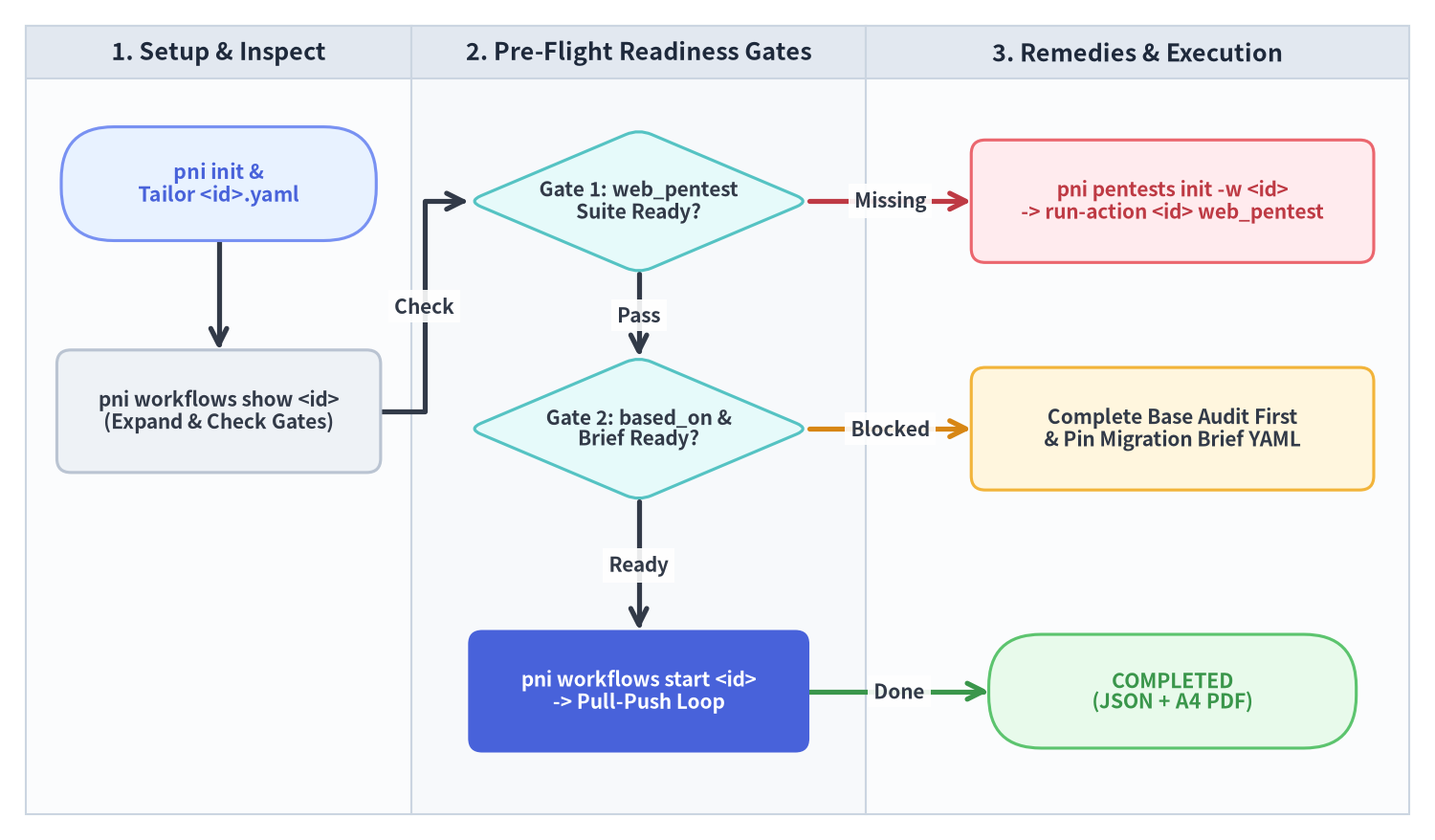
Source Code
from drawlib.canvas import save, setup
from drawlib.diagrams.flow import Decision, End, FlowDiagram, Process, Start
from drawlib.styles import Styles

setup(width=164, height=96, dpi=150)

flow = FlowDiagram(
    node_style=Styles.WhiteBordered.patch(
        text_color=Styles.Dark.text_color, shape_r=1.6, text_size=10.0
    ),
    edge_style=Styles.DarkBold,
    edge_text_style=Styles.DarkBold.patch(text_size=10.0),
    width=158.0,
    height=90.0,
)

flow.add_lane("1. Setup & Inspect", width=44.0)
flow.add_lane("2. Pre-Flight Readiness Gates", width=52.0)
flow.add_lane("3. Remedies & Execution", width=62.0)

n_init = flow.add(
    Start(
        "pni init &\nTailor <id>.yaml",
        width=36.0,
        height=13.0,
        style=Styles.PrimaryNeutral.patch(shape_r=6.0),
        text_style=Styles.PrimaryBold.patch(text_size=10.2),
    ),
    xy=(22.0, 72.0),
)

n_show = flow.add(
    Process(
        "pni workflows show <id>\n(Expand & Check Gates)",
        width=37.0,
        height=14.0,
        style=Styles.Neutral.patch(shape_r=1.6),
        text_style=Styles.DarkBold.patch(text_size=10.0),
    ),
    xy=(22.0, 46.0),
)

g_pentest = flow.add(
    Decision(
        "Gate 1: web_pentest\nSuite Ready?",
        width=39.0,
        height=16.5,
        style=Styles.SecondaryNeutral,
        text_style=Styles.DarkBold.patch(text_size=10.0),
    ),
    xy=(70.0, 70.0),
)

r_pentest = flow.add(
    Process(
        "pni pentests init -w <id>\n-> run-action <id> web_pentest",
        width=46.0,
        height=14.0,
        style=Styles.DangerNeutral.patch(shape_r=1.6),
        text_style=Styles.DangerBold.patch(text_size=10.0),
    ),
    xy=(131.0, 70.0),
)

g_based = flow.add(
    Decision(
        "Gate 2: based_on &\nBrief Ready?",
        width=39.0,
        height=16.5,
        style=Styles.SecondaryNeutral,
        text_style=Styles.DarkBold.patch(text_size=10.0),
    ),
    xy=(70.0, 44.0),
)

r_based = flow.add(
    Process(
        "Complete Base Audit First\n& Pin Migration Brief YAML",
        width=46.0,
        height=14.0,
        style=Styles.WarningNeutral.patch(shape_r=1.6),
        text_style=Styles.DarkBold.patch(text_size=10.0),
    ),
    xy=(131.0, 44.0),
)

n_start = flow.add(
    Process(
        "pni workflows start <id>\n-> Pull-Push Loop",
        width=39.0,
        height=14.0,
        style=Styles.PrimaryFlat.patch(shape_r=1.6),
        text_style=Styles.WhiteBold.patch(text_size=10.0),
    ),
    xy=(70.0, 14.0),
)

n_done = flow.add(
    End(
        "COMPLETED\n(JSON + A4 PDF)",
        width=42.0,
        height=13.0,
        style=Styles.SuccessNeutral.patch(shape_r=6.0),
        text_style=Styles.SuccessBold.patch(text_size=10.2),
    ),
    xy=(131.0, 14.0),
)

n_init.connect(n_show, start_side="bottom", end_side="top")
n_show.connect(g_pentest, label="Check", start_side="right", end_side="left")
g_pentest.connect(r_pentest, label="Missing", start_side="right", end_side="left", style=Styles.DangerBold)
g_pentest.connect(g_based, label="Pass", start_side="bottom", end_side="top")
g_based.connect(r_based, label="Blocked", start_side="right", end_side="left", style=Styles.WarningBold)
g_based.connect(n_start, label="Ready", start_side="bottom", end_side="top")
n_start.connect(n_done, label="Done", start_side="right", end_side="left", style=Styles.SuccessBold)

flow.draw(xy=(3.0, 3.0))
save()
If your workflow includes dynamic Web penetration testing (uses: web_penetration_audit), initialize and verify the target's penetration test suite before starting the stateful run:
# Scaffold .pni/pentests/<target>/ and test the step directly with zero SQLite prep
pni pentests init -w full_audit
pni workflows run-action full_audit web_pentest
4. Step 3: Execute the Stateful Pull-Push Loop
Start the workflow to create a stateful session (wf-<8hex>) in .pni/cache/workflow_state.db, then iterate through get-action and push-action:
# 1. Start a stateful workflow run (use --supersede to cancel older unfinished runs)
pni workflows start full_audit --supersede

# 2. Pull the current action (auto-runs deterministic analyzers and outputs required JSON Schema)
pni workflows get-action wf-1a2b3c4d

# 3. Push the validated AI JSON payload for the current action ID (e.g. act-01)
pni workflows push-action wf-1a2b3c4d act-01 --file payload.json

# 4. Monitor progress across steps at any time
pni workflows status wf-1a2b3c4d
During the loop:
- Deterministic Primitives Run Automatically: Whenever
get-actionencountersproject_inspect,ast_analyze,run_check,security_scan,web_pentest,migration_analyze, orprogress_analyze,pniexecutes the analyzer immediately, caches the telemetry in.pni/cache/<workflow_id>/facts.json, and advances to the next AI step. - Schema & Path Validation on Push: On
record_architecture,ai_interpret,emit_score,emit_migration_plan, andemit_progress,push-actionvalidates the JSON payload against Pydantic models and verifies every referenced file path against the repository'smodule_inventory.
5. Step 4: Compile the Visual Drawlib PDF Report
On the final write_drawlib_report step, scaffold the 7-chapter Drawlib report project, visually verify diagrams with the coordinate grid (-g), compile the A4 vector PDF, and push the completion record:
# Scaffold reports_src/full_audit_src/ and compile reports/full_audit.pdf
pni report init full_audit --src-dir reports_src --lang en --style google
pni report build full_audit --src-dir reports_src --output-dir reports

# Push the final completion payload to mark the workflow COMPLETED
pni workflows push-action wf-1a2b3c4d act-12 '{"generated_files": ["reports/full_audit.pdf"], "summary": "Compiled 7-chapter A4 PDF report."}'
Next, explore the Primary Use Cases or dive into Workflows & Pre-Flight Gates.